- Published on
Boox Go 10.3 (Gen II) Lumi, analysis: if it is not the best e-book reader, it is almost missing
- Authors

- Name
- aimode.news
- @aimode_news
I think that, as a reader in general and a manga lover in particular, I have found the gift that I will put this year in the letter to the Three Wise Men. Each and every one of the gadgets that I have tried to read digitally has given me some problem: either they are small, or their screens tire my eyes, or they distract me with notifications or they do not easily accept the most common formats. The Boox Go 10.3 (Gen II) Lumi is the complete opposite. It is what, as a reader, I would definitely want to have on my nightstand and in my backpack. The only thing I'm missing is the 450 euros that, unfortunately for my pocket, it costs.
✅ Buy it if...
- You read a lot in digital.
- You want a comfortable, large e-book reader with a good battery.
- You don't like the idea of having to buy all the books on Amazon Kindle.
❌ Don't buy it if...
- You tend to read unusually or sporadically.
- You don't want to spend a lot of money.
- You want a color screen.
The essentials in 30 seconds
The Boox Go 10.3 (Gen II) Lumi is a book reader with a 10.3-inch black and white e-ink display. Everything is normal, except for the operating system, which is Android 15. What does that mean? That you have access to Google Play and, therefore, to the entire ecosystem of reading (and non-reading) apps available for Android. It doesn't tie you to a platform (like Kindles), but rather gives you total freedom.
It works sensationally, it supports all home formats (PDF, EPUB, CBR, MOBI, doc, docx...), it has a backlight (it's the difference between the Lumi model and the standard one) and the pen is very useful. Your main problem? That it does not have a color screen, that it has little capacity and that the price to pay for it is quite high.
Now, if you do not intend to read color documents and are looking for a good black and white reading device for books and manga, this is, without a doubt, one of the options to consider.
Our experience with the Boox Go 10.3 (Gen II) Lumi
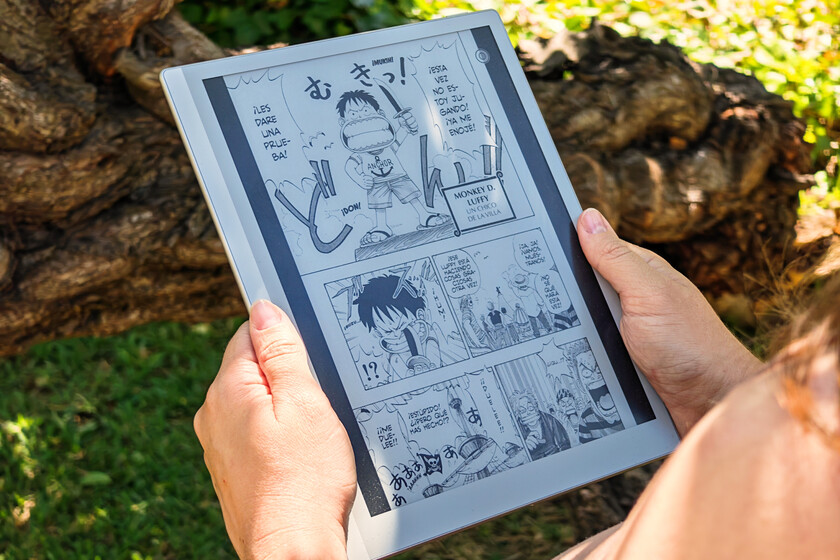
E-ink display: pros. If we talk about reading for a long time, electronic ink screens have no rival: they strain the eyes much less, have fewer reflections and do not suffer when placed in broad daylight. This device features a 10.3-inch eInk panel with 300 pixels per inch resolution and, simply put, it looks great. Not only is the text crisp, but the manga drawings and fine panel details look spectacular. I have not had the slightest problem when reading books, manga, websites and even working with PDFs.
- A note on qualities: the device offers us several screen configurations, so we can choose if we want a faster refresh at the cost of losing sharpness, or more sharpness at the expense of losing transition speed. Here to taste. I have used it most of the time with the second configuration.
Big, but comfortable. It is a large device, but very thin and weighs 300 grams. This means that we can carry it in our backpack without it getting in the way (it came with me to Poland, in fact) or that we can use it in bed without our arms getting tired. In fact, it's funny that the pencil, which we'll talk about shortly, is thicker than the reader itself. The weight seems more than it is, in practice it doesn't feel like it weighs a third of a kilo.
He moves in fear. Although its specifications may seem modest, the truth is that Android 15 runs well with the four gigabytes of RAM and the Snapdragon 750G processor that it has. The 64 GB of storage, however, seems somewhat scarce to me and, furthermore, they are not expandable. By default, there is some ghosting when we turn pages, but it is neither very exaggerated nor is it something that cannot be fixed by adjusting the refresh rate. I have it configured so that the screen refreshes completely when turning five pages, but if having the shadow of the page is a nuisance it can be adjusted so that it refreshes when turning one. This, needless to say, will slow down loading.
Android is always a good idea. The interface is well adapted and has everything necessary to work, namely a reading app compatible with all formats, a browser, an AI assistant whose presence is testimonial, and Google Play. The advantage, of course, is the compatibility with Android apps, so you can install Google Play Books, Kindle, Moon Reader, Notion or Manga Plus to stay up to date with One Piece. It supports all popular formats, so you can use any EPUB, MOBI or PDFs you buy on any platform.
- The pencil thing: the device includes a stylus to take notes, write, make annotations on files, etc. It works quite well and responds to pressure, but there is minimal latency that makes typing feel a bit clunky. It makes more sense to make specific annotations on a PDF or a drawing than to take quick notes in a class, for example.
Charger? The device arrived charged at 80% 16 days ago and today, after using it literally every day for at least an hour-hour and a half, I put it on charge with 28% battery remaining. This is the advantage of these devices: they barely consume anything. Loading is a little slow, but nothing to worry about considering that we will do it every so often.
Boox Go 10.3 (Gen II) Lumi technical sheet
|
|
Boox Go 10.3 (Gen II) Lumi |
|---|---|
|
Dimensions and weight |
235 x 183x 4.8mm 364 grams |
|
Screen |
10.3 inches without reflections Resolution: 2,480 x 1,860 pixels 300 DPI Touch+capacitive screen Backlight (warm and cold) |
|
RAM |
4GB |
|
Storage |
64GB |
|
Battery |
3,700 mAh |
|
Connectivity and ports |
2.4 GHz and 5.0 GHz WiFi Bluetooth 5.1 USB-C connection |
|
Water resistance |
IPX8 |
|
operating system |
Android 15 Support for third-party apps |
|
Supported formats |
Documents: PDF, CAJ, DJVU, CBR, CBZ, EPUB, EPUB3, AZW3, MOBI, TXT, DOC, DOCX, FB2, CHM, RTF, HTML, ZIP, PRC, PPT, PPTX Image: PNG, JPG, BMP, Audio: WAV, MP3 |
|
Others |
Stylus included 2x speakers 2x microphones USB OTG |
|
Price |
Boox Go 10.3 (Gen II) Lumi, Xataka's opinion
The Boox Go 10.3 (Gen II) Lumi is a device that works perfectly and that serves as an e-book reader and, if you hurry me, even as a productivity device thanks to the pen. It's responsive, the screen is wonderful, having adjustable backlighting is great for reading at night, and Android is a very sensible choice.
If I had to criticize it, I would say that 64 GB is not enough (especially to store many manga or PDFs), that the screen is not color and that its price is quite high, but otherwise I must admit that I have enjoyed using this device like a little child.
Do I recommend it to you?
Without a doubt. The only context in which I would not recommend it is if you are going to read color comics. In any other context, and as long as 450 euros is an acceptable expense, it is a great purchase that you can enjoy reading any genre. Frankly, I have a hard time finding a fault with the device.
Ana, if you're reading this, the device is called Boox Go 10.3 (Gen II) Lumi and my birthday is in a little over a month. In case it sneaks.
Images | Xataka
This device has been provided for testing by Boox. You can check how we do reviews on Xataka and our relations policy with companies.